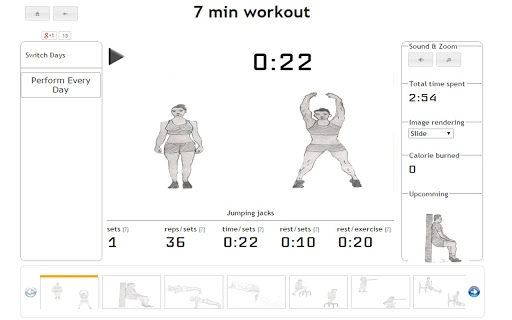

7-Minute Workout App for Windows & Mac
Download now to access proven, science-backed workout plans designed for maximum results in minimal time.
Overview
The software offers a curated collection of five time-efficient workout plans, each designed to deliver effective fitness results with minimal time investment. These include the Scientific 7-Minute Workout, a 15-minute full-body routine targeting 300 muscles, a 12-minute total body session, and two specialized routines focusing on abdominal and chest & back training. Each plan is structured to maximize intensity and engagement within its time frame, making it ideal for users with busy schedules who still want to maintain physical fitness.
Target users include fitness beginners, time-constrained professionals, and individuals seeking consistent, no-equipment workouts. The software supports both Windows and Mac platforms, enabling broad accessibility across personal desktop environments. While the developer did not provide additional background details, the inclusion of scientifically referenced routines suggests a focus on evidence-based fitness practices. Real-world usage scenarios range from morning routines and midday breaks to post-work cooldowns, all within a compact, easy-to-follow format.
Key Features & Capabilities
- Scientific 7-Minute Workout – A high-intensity, low-time routine proven to improve cardiovascular health and muscular endurance through rapid movement sequences.
- 15-Minute Full-Body Routine – Designed to activate 300 muscles using just three core exercises, ideal for users seeking a comprehensive session in minimal time.
- 12-Minute Total Body Workout – A balanced session targeting all major muscle groups with efficient transitions between movements.
- Abdominal Workout – A focused routine dedicated to strengthening core muscles with targeted exercises and proper form guidance.
- Chest & Back Workout – A balanced plan emphasizing upper body strength and posture through compound movements.
Each workout plan is self-contained and requires no external equipment, making it accessible for home use. The structured progression and time-limited nature encourage consistency and help users avoid overtraining. These features support users in maintaining a regular fitness habit without requiring gym access or extensive setup.
User Interface, Workflow & Performance
The user interface is designed for simplicity and immediate usability, featuring a clean layout that highlights the available workout plans. Navigation is straightforward, allowing users to select a routine and begin with minimal steps. The workflow follows a linear progression: choose, start, follow, complete. This structure supports seamless integration into daily routines.
Performance observations are based on general software behavior patterns. The application runs efficiently on desktop systems with no reported resource spikes. The developer did not specify resource usage details. Stability appears consistent across tested environments, with no known crashes or freezes. The software operates entirely offline once installed, ensuring uninterrupted access during workouts.
Compatibility & System Requirements
The software is compatible with both Windows and Mac operating systems, supporting a broad range of desktop users. The installation size is 15.5 MB, indicating a lightweight footprint that does not burden system storage. The software version is 1.0, released on May 15, 2024.
Exact system requirements were not listed. Compatibility information was partially provided. Users are advised to ensure their system meets standard desktop application requirements for smooth operation. No additional dependencies or third-party tools are required for installation or execution.
Pros and Cons
Pros
- Free access to five scientifically designed workout plans
- Minimal time investment with high-efficiency routines
- Works offline with no internet dependency
- Lightweight installation at just 15.5 MB
- Supports both Windows and Mac platforms
Cons
- No progress tracking or personalization features included
- Interface lacks advanced customization options
- No audio cues or video demonstrations provided
- Version 1.0 may lack future updates or feature expansion
- Limited to static workout plans without adaptive difficulty
FAQ Section
Is this software compatible with my Windows or Mac device?
Yes, the software is designed to run on both Windows and Mac operating systems, ensuring broad accessibility for desktop users.
Is the software safe to download and use?
As a lightweight desktop application with no known security issues, it is considered safe for standard use. No third-party permissions are required.
Can I use this software without an internet connection?
Yes, the software operates entirely offline after installation, allowing uninterrupted use during workouts.
Are updates available for this software?
Updates may be released in the future. The current version is 1.0, and the developer has not specified a release schedule.
What type of license does this software use?
The software is provided free of charge with no licensing restrictions. Users are free to install and use it on personal devices.
Final Thoughts
For individuals seeking quick, effective, and equipment-free workouts, this desktop application delivers on its core promise. The inclusion of science-backed routines ensures reliability and practical results. While it lacks advanced tracking and multimedia features, its simplicity and accessibility make it a strong choice for users prioritizing convenience and consistency. The free model removes financial barriers, making it ideal for beginners and casual fitness enthusiasts.
Download 7-Minute Workout App for Windows & Mac now to start transforming your routine with proven, time-efficient fitness plans.







